How to get Teto, step by step
Select a step to see the instructions and any available screenshots.
LOBBY → PASSES
Start in the lobby
Sign in to the Epic account where you want the Outfit. From the lobby, find the passes area. The wording and layout may vary with the current game interface.
Navigation labels are guidance, not a verified pixel-by-pixel walkthrough of the current UI. Source: Epic’s access and reward announcement.
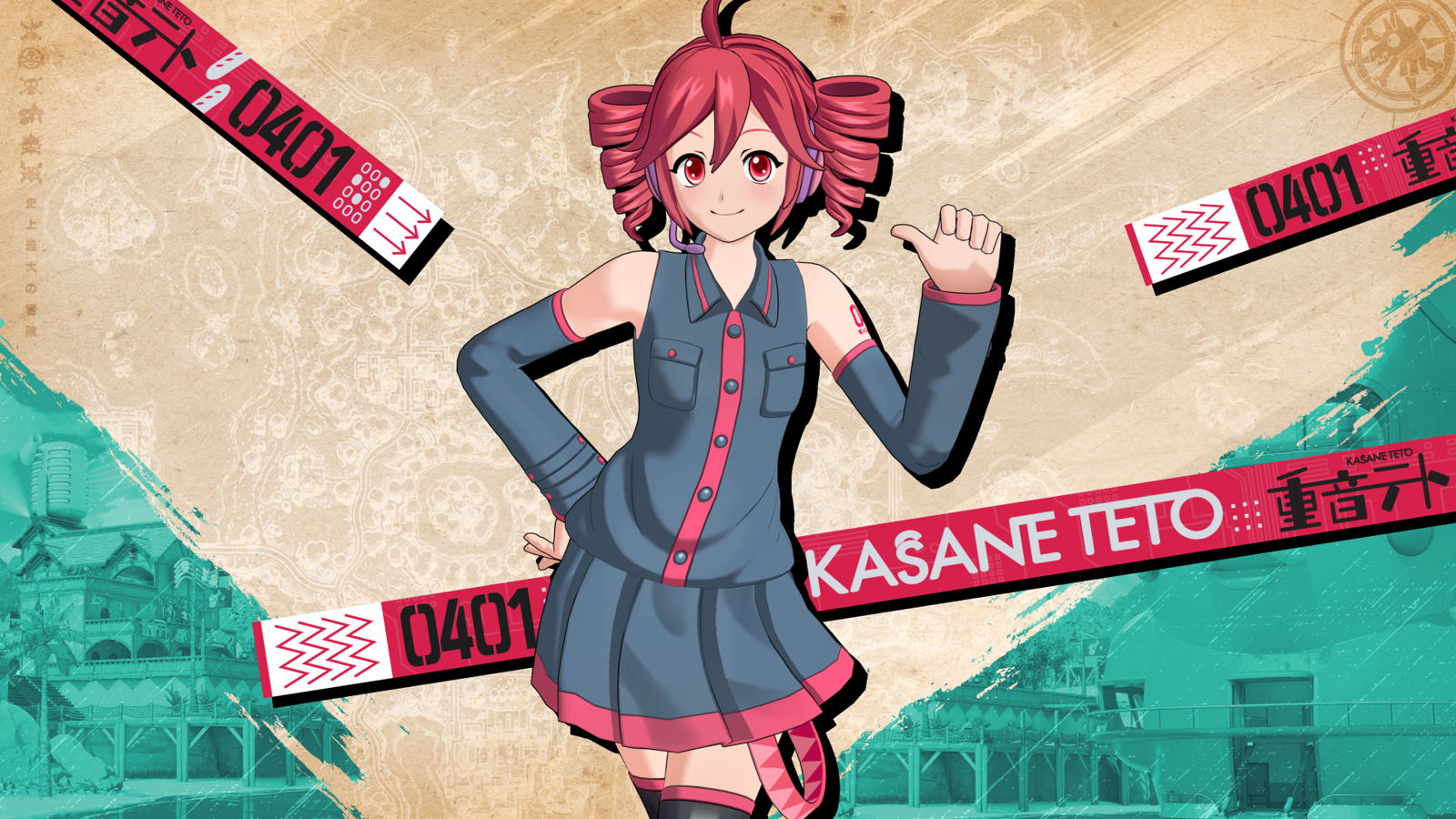
What does the Teto skin look like?
Teto brings her distinctive drill-shaped twin tails into Fortnite. Use the official promotional image above and the linked gameplay showcase below to compare her appearance before buying. Promotional art is useful for identifying the character, while footage is better for judging movement, proportions and how an Outfit reads during play. Neither an illustration of Teto from another product nor a fan-made Fortnite concept is proof of the released skin. When comparing images, pay attention to the source and publication date, especially if you found them through an old social post.
How to get the Outfit
Open Fortnite on the Epic account where you want to keep your cosmetics, then look for the TWINDRILL DIVA Music Mini-Pass in the passes area. Review the reward preview and purchase confirmation rather than assuming that a similarly named shop offer contains the same items. If you already have an active Crew subscription, check whether the pass is accessible before spending V-Bucks. Once access is granted, look for Teto in your Locker. Additional rewards have their own progression requirements; buying access does not mean that every slot has already been completed.
Base Outfit versus the reactive style
The base character and the final music-reactive option are different milestones. Epic identifies the reactive style as the last tier reward. That matters if the glowing presentation in a clip is the reason you want the skin: check the final reward preview and plan time to progress through the pass. Do not interpret a video switching between appearances as evidence that both are delivered immediately. After earning a style, inspect the Outfit’s edit options in your Locker. The in-game preview is the best place to see which presentation choices your account currently owns.
What you are paying for
The advertised 1,000 V-Bucks is the pass price, rather than a separately confirmed standalone Item Shop price for Teto. Treat a pass purchase and a future shop purchase as different offers. For a useful comparison, list the rewards you actually want: the Outfit, a particular accessory, or music you will play. Someone who only wants the character may judge the offer differently from a Festival player collecting tracks. Our price guide breaks down those purchase decisions, while the rewards guide gives you a checklist to compare against the pass screen.
Check the skin in real footage
The embedded video is a third-party rewards showcase credited to REFORTNITER, not a ZoneZine gameplay recording or an Epic trailer. Use it to inspect the released cosmetics, then verify entitlement and progression in the game itself. Video compression, display settings and scene lighting can affect how colours appear. If playback is unavailable, follow the creator’s original YouTube link beneath the player. We also link the official announcement so you can separate confirmed product details from a creator’s impressions. We have not personally tested the Outfit in a live match.
Before you confirm a purchase
Check the account name, current balance, selected pass and the contents shown on the confirmation screen. If the Outfit does not appear afterwards, check your transaction history and Locker before buying anything again. Avoid external offers promising a cheap account with the skin already attached: this guide only describes the official in-game purchase route. For timing, read the release-date page; the pass launch and the later Battle Royale island appearance are separate events. New to Teto? The character profile explains the virtual singer behind the collaboration without requiring any Fortnite knowledge.
Watch the rewards showcase
Sources & editorial note
This is a sourced editorial guide, not hands-on testing. Information is a dated snapshot; consult Fortnite for live offers and requirements. No affiliate links or sponsored placements appear in this guide.